
🔥 Introduction: Your Private Cloud on AWS
When you deploy applications on AWS, they need a secure, isolated, and scalable environment to run. You wouldn’t put your sensitive customer data or business logic directly onto the public internet—you need a network boundary.
That networking boundary is called Amazon VPC (Virtual Private Cloud) — essentially, your own private, customizable data center inside AWS.
The power of VPC is in the control it grants you. You are in charge of every aspect of the network, including:
- IP addressing (choosing your private IP ranges).
- Subnets (defining public vs. private areas).
- Routing logic (controlling who talks to whom).
- Firewall security (using Security Groups and NACLs).
- Connectivity (to the Internet, or back to your On-Premises data center).
Whether you’re launching a simple website, deploying a complex multi-tier application, or running a large-scale Kubernetes cluster, the VPC is the fundamental, non-negotiable foundation of your AWS architecture.
🧭 What is AWS VPC? (Simple Definition)
A VPC is a virtual private network inside AWS where you securely run your cloud resources (like EC2 instances, RDS databases, Lambda functions, etc.).
It is logically isolated from all other virtual networks in the AWS Cloud. It behaves exactly like your own traditional data center network, but with the scalability and elasticity of the cloud:
- ✔ You choose the IP ranges: Defining your network’s size and address space.
- ✔ You control traffic flow: Specifying routing rules for internal and external communication.
- ✔ You secure it with firewalls: Implementing defense-in-depth with multiple security layers.
- ✔ You connect it with other networks: Enabling hybrid cloud and inter-VPC communication.
🏁 Default VPC vs. Custom VPC: The Production Choice
When you first open an AWS account, a Default VPC is automatically created for you in each region.
| Feature | Default VPC | Custom VPC | Why Choose Custom? |
| Created by | AWS | You | Full control over the CIDR range. |
| Internet-Ready | Yes (has IGW) | You decide | Ability to create fully isolated networks. |
| Subnets | One per AZ (all public) | Public + Private | Essential for a secure, multi-tier architecture. |
| Security | Limited control | Full control | You set up explicit routing and security boundaries. |
| Suitable for | Quick testing only | Production, Security, Compliance | Industry standard for any real-world app. |
👉 The Rule: Always use a Custom VPC for any real-world, production, or non-trivial system. The default VPC lacks the necessary security segmentation (Private Subnets) required for a modern cloud application.
🌍 CIDR Blocks — Defining Your Network Size and Scope
CIDR (Classless Inter-Domain Routing) is the standard method for defining network address ranges. In AWS, the CIDR block is the single most important decision, as it dictates the maximum size of your VPC.
Your VPC CIDR must be a private IP range (e.g., $10.0.0.0/8$, $172.16.0.0/12$, or $192.168.0.0/16$).
| CIDR | IP Count | Best Use |
| $/16$ | 65,536 | The whole VPC network. (e.g., $10.0.0.0/16$) |
| $/20$ | 4,096 | For large Private Subnets. |
| $/24$ | 256 | Standard for smaller Public Subnets. |
📌 Key Rule: Never overlap CIDR blocks if you plan on connecting two VPCs using VPC Peering or a Transit Gateway. Overlapping IP addresses will cause routing conflicts and prevent connectivity.
📌 AWS Reserves 5 IPs: For every subnet you create, AWS reserves the first four and the last IP address for internal use. For a $/24$ subnet (256 IPs), you only have $256 – 5 = 251$ usable IP addresses.
🏗️ Subnets — Divide and Secure Your Network
A VPC is divided into subnets—smaller, contiguous chunks of the VPC’s IP range. Critically, each subnet must reside entirely within a single Availability Zone (AZ), making subnets the primary way to design for High Availability (HA).
Two Essential Types of Subnets
| Public Subnet | Private Subnet |
| Has a route to an Internet Gateway (IGW). | No direct route to an IGW. |
| Used for Web servers, Bastion hosts, Load Balancers. | Used for DB servers, Application backend, Caching layers. |
| Requires an Elastic IP for direct internet inbound. | Requires a NAT Gateway for outbound-only internet access. |
| Medium Security (exposed to the internet). | Highly Secure (fully isolated from the internet). |
📌 Best Practice: Always design for Multi-AZ (at least 2). This means you should aim for:
- At least 2 Public Subnets (one in each AZ).
- At least 2 Private Subnets (one in each AZ).
🧠 Route Tables — Who Talks to Whom?
Every subnet is linked to a Route Table, which contains a set of rules, called routes, that determine where network traffic is directed.
| Destination | Target | Meaning |
| VPC CIDR (e.g., $10.0.0.0/16$) | local | Internal communication within the VPC is always allowed by default. |
| $0.0.0.0/0$ | IGW (Internet Gateway) | The subnet is a Public Subnet and can send/receive traffic to the Internet. |
| $0.0.0.0/0$ | NAT Gateway | The subnet is a Private Subnet and can send outbound traffic to the Internet (e.g., for updates) but blocks inbound traffic. |
| Other VPC CIDR | VPC Peering Connection | Allows traffic to flow to a different VPC. |
📌 Criticality: Wrong routing = no connectivity. A single incorrect route table entry can lead to a security hole or a complete loss of service.
🌐 Network Connectivity Options (Advanced)
Once your basic VPC is set up, you need to connect it to the outside world, to other VPCs, or back to your data center.
| Component | Purpose | Key Detail |
| Internet Gateway (IGW) | Public Access | Attaches to the VPC to enable internet connectivity for public subnets. |
| NAT Gateway | Private Outbound Only | Allows private subnets to initiate outbound internet connections securely. It is one-way. |
| VPC Peering | VPC-to-VPC (1:1) | Connects two VPCs within the same or different regions, behaving as one network. Not transitive. |
| VPN (Site-to-Site) | Cloud ↔ On-Prem (Secure Tunnel) | Securely connects your on-premises network to your VPC over the public internet. |
| Direct Connect (DX) | Private Leased Line | A dedicated, private, physical network connection between your data center and AWS. Used for high-throughput/low-latency needs. |
| Transit Gateway (TGW) | Hub Connecting 1000s of VPCs | Acts as a central network hub, simplifying the management of a large-scale, multi-VPC enterprise network mesh. |
📌 Security Focus: NAT Gateway is safer for backend resources because it only allows outbound-initiated connections, preventing any unsolicited inbound traffic from the internet.
🔒 Security Controls in VPC: Defense in Depth
AWS provides two essential, overlapping security layers within your VPC.
1. Security Groups (SG) — Instance-Level Firewall
- Scope: Applied directly to a resource (EC2 instance, Load Balancer, RDS, etc.).
- Stateful: If you allow inbound traffic, the return (outbound) traffic is automatically allowed—you don’t need a separate rule.
- Rules: Allow-only rules. By default, it denies everything, and you must explicitly allow the required traffic.
- Best Use: The main layer of protection.
2. Network ACLs (NACL) — Subnet-Level Protection
- Scope: Applied to the Subnet boundary.
- Stateless: If you allow inbound traffic, you must explicitly allow the return outbound traffic (and vice-versa).
- Rules: Supports both Allow and Deny rules (using numbered rule priority).
- Best Use: Additional defense. Great for blacklisting specific malicious IP addresses before they even hit your instances.
| Feature | Security Group (SG) | Network ACL (NACL) |
| Scope | Instance/Interface | Subnet |
| Stateful | ✔ Yes (Return traffic auto-allowed) | ❌ No (Must define inbound and outbound rules) |
| Allow/Deny | Allow only | Both Allow & Deny |
🔌 VPC Endpoints — No Internet? No Problem! (Advanced)
For the highest security and compliance requirements, you may need your private subnets to access other AWS services (like S3, DynamoDB, SQS, etc.) without using the Internet Gateway (IGW) or a NAT Gateway.
VPC Endpoints solve this by creating a private, secure connection from your VPC directly to the service within the AWS network.
| Type | Connects To | Usage |
| Gateway Endpoint | S3, DynamoDB | Uses a route table entry as the target. No hourly cost. |
| Interface Endpoint | SNS, SQS, ECR, CloudWatch (most other services) | Creates an Elastic Network Interface (ENI) with private IPs in your subnet. Hourly cost applies. |
📌 Security Benefit: VPC Endpoints are a core component of a zero-trust architecture, as they prevent data exposure to the public internet while maintaining necessary AWS API access.
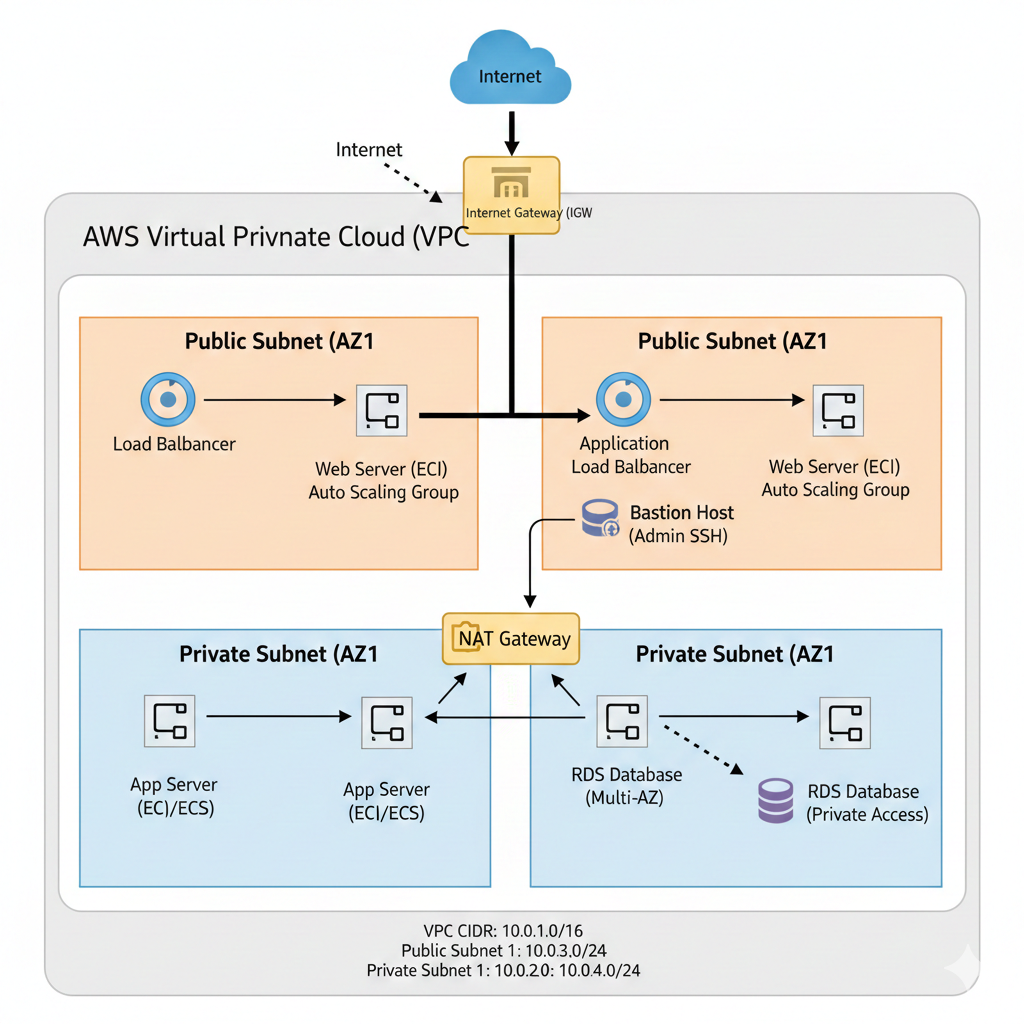
🧬 Real-World Architecture Example
This is the industry-standard, multi-AZ, three-tier architecture in a VPC:
🚀 Use Case + Example: Three-Tier App in VPC
| Layer | Placement | Reason |
| Frontend/Load Balancer | Public Subnet | Needs to be directly accessible by internet users. |
| Application EC2/ECS | Private Subnet | Protected from direct internet access, only accessible via the Load Balancer. |
| Database (RDS) | Private Subnet (or isolated) | Most critical and sensitive resource; absolutely no internet access. |
| Bastion Host | Public Subnet | A hardened jump box used for secure, administrative SSH access into the Private Subnets. |
| S3 Access | VPC Endpoint | To securely retrieve/store static assets without using the NAT Gateway. |
This architecture ensures a clear separation of concerns and maximum protection for your most valuable assets (the data).
🧰 Troubleshooting and Optimization
Troubleshooting Tools
- VPC Flow Logs: Your primary tool for network troubleshooting. They capture information about the IP traffic going to and from network interfaces in your VPC, allowing you to view allowed or blocked connections.
- Reachability Analyzer: A powerful tool that analyzes the network path between two resources (e.g., EC2 instance to Database) and checks for any misconfigurations in route tables or security groups.
💰 Cost Optimization Tips
- NAT Gateway Cost: NAT Gateways are expensive. Use only one per Availability Zone for redundancy, and consider the costs.
- VPC Endpoints vs. NAT: Prefer VPC Endpoints (especially Gateway Endpoints) over NAT for heavy traffic to AWS APIs (like S3), as the API traffic is free/cheaper over the endpoint and avoids the high data processing charges of the NAT Gateway.
- CIDR Sizing: Use a smaller CIDR (like $/20$ or $/24$) unless you are absolutely sure massive scaling is required. Wasting private IP space is a poor practice.
Conclusion
The AWS VPC is far more than just a networking service; it is the backbone of your entire cloud environment. Mastering the concepts of CIDR, Subnets, Route Tables, and the security layers (SG/NACL) is the single most important skill for any AWS architect or engineer.
